
 Documentation STACK
Accueil de la documentation | Index des catégories | Carte du site | Plan du site en anglais
Free-text input
This input allows you to type in free text, e.g. your complete working or mathematical proof.
- You can type markdown text.
- You can type AsciiMath between backticks for mathematics:
... - You can include LaTeX between brackets,

- Sometimes, but not always, you will be able to include calculations between
{@...@}. Rather than reaching for an external calculator, the software will replace your requested calculation with the answer.
Mathematics
If you would like mathematical expressions/equations to be inline then use AsciiMath. For example
This problem asks us to solve `x^2-10x+9=0`, which is a quadratic equation.
If you would like mathematical expressions/equations to be displayed then also use AsciiMath, but put backticks `` on a single line at the start and end. For example
To solve `x^2-10x+9` we work line by line
`
x^2-10x+9
(x-5)^2-16=0
(x-5)^2-4^2=0
(x-5-4)(x-5+4)=0
(x-9)(x-1)=0
x=9 or x=1
`
If you have text on the same line as a backtick you will get inline mathematics.
Markdown
Markdown is a lightweight markup language for creating formatted text using a plain-text editor.
Here are some example of what you need to type to format text.
# Heading

## Sub-heading

Paragraphs are separated by a blank line.

Two spaces at the end of a line
produce a line break.

Text attributes _italic_, **bold**.

Horizontal rule:

---

Bullet lists nested within numbered list:

  1. fruits
     * apple
     * banana
  2. vegetables
     - carrot
     - broccoli
In normal markdown backticks are used for monospace
`monospace`
However free-text input uses backticks for AsciiMath, see below.
AsciiMath
AsciiMath is an easy-to-write markup language for mathematics. Most AsciiMath symbols attempt to mimic in text what they look like rendered, like oo for  . Many symbols can also be displayed using a LaTeX alternative (see below), but without a backslash.
Input
`sum_(k=1)^oo 1/k^2=pi^2/6`
is rendered as 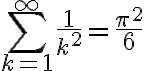 .
.
Operation symbols
| Type | See | TeX alt |
|---|---|---|
+ |
 |
|
- |
 |
|
* |
 |
cdot |
** |
 |
ast |
*** |
 |
star |
// |
 |
|
\\ |
 |
backslash, setminus |
xx |
 |
times |
-: |
 |
div |
|>< |
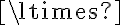 |
ltimes |
><| |
 |
rtimes |
|><| |
 |
bowtie |
@ |
 |
circ |
o+ |
 |
oplus |
ox |
 |
otimes |
o. |
 |
odot |
sum |
 |
|
prod |
 |
|
^^ |
 |
wedge |
^^^ |
 |
bigwedge |
vv |
 |
vee |
vvv |
 |
bigvee |
nn |
 |
cap |
nnn |
 |
bigcap |
uu |
 |
cup |
uuu |
 |
bigcup |
Miscellaneous symbols
| Type | See | TeX alt |
|---|---|---|
2/3 |
 |
frac{2}{3} |
2^3 |
 |
|
sqrt x |
 |
|
root(3)(x) |
![\sqrt[3]{x}](https://eformation.univ-grenoble-alpes.fr/filter/tex/pix.php/6833f4eaccfb60d5c13fdf6b6cc30aef.gif "\sqrt[3]{x}") |
|
int |
 |
|
oint |
 |
|
del |
 |
partial |
grad |
 |
nabla |
+- |
 |
pm |
O/ |
 |
emptyset |
oo |
|
infty |
aleph |
 |
|
:. |
 |
therefore |
:' |
 |
because |
|...| |
 |
|ldots| |
|cdots| |
 |
|
vdots |
 |
|
ddots |
 |
|
|\ | |
 |
|
|quad| |
 |
|
/_ |
 |
angle |
frown |
 |
|
/_\ |
 |
triangle |
diamond |
 |
|
square |
 |
|
|__ |
 |
lfloor |
__| |
 |
rfloor |
|~ |
 |
lceiling |
~| |
 |
rceiling |
CC |
 |
|
NN |
 |
|
QQ |
 |
|
RR |
 |
|
ZZ |
 |
|
"hi" |
 |
\text{hi} |
Relation symbols
| Type | See | TeX alt |
|---|---|---|
= |
 |
|
!= |
 |
ne |
< |
 |
lt |
> |
 |
gt |
<= |
 |
le |
>= |
 |
ge |
mlt |
 |
ll |
mgt |
 |
gg |
-< |
 |
prec |
-<= |
 |
preceq |
>- |
 |
succ |
> -= |
 |
succeq |
in |
 |
|
!in |
 |
notin |
sub |
 |
subset |
sup |
 |
supset |
sube |
 |
subseteq |
supe |
 |
supseteq |
-= |
 |
equiv |
~= |
 |
cong |
~~ |
 |
approx |
prop |
 |
propto |
Logical symbols
| Type | See | TeX alt |
|---|---|---|
and |
 |
|
or |
 |
|
not |
 |
neg |
=> |
 |
implies |
if |
 |
|
<=> |
 |
iff |
AA |
 |
forall |
EE |
 |
exists |
_|_ |
 |
bot |
TT |
 |
top |
|-- |
 |
vdash |
|== |
 |
models |
Grouping brackets
| Type | See | TeX alt |
|---|---|---|
( |
 |
|
) |
 |
|
[ |
 |
|
] |
![]](https://eformation.univ-grenoble-alpes.fr/filter/tex/pix.php/0fbd1776e1ad22c59a7080d35c7fd4db.gif "]") |
|
(: |
 |
langle |
:) |
 |
rangle |
<< |
 |
|
>> |
 |
|
floor(x) |
 |
|
ceil(x) |
 |
|
norm(vecx) |
 | | |
Note, you can also use {...} for curly braces and abs(x) for  .
.
Arrows
| Type | See | TeX alt |
|---|---|---|
uarr |
 |
uparrow |
darr |
 |
downarrow |
rarr |
 |
rightarrow |
-> |
 |
to |
>-> |
 |
rightarrowtail |
->> |
 |
twoheadrightarrow |
\|-> |
 |
mapsto |
larr |
 |
leftarrow |
harr |
 |
leftrightarrow |
rArr |
 |
Rightarrow |
lArr |
 |
Leftarrow |
hArr |
 |
Leftrightarrow |
Accents
| Type | See | TeX alt |
|---|---|---|
hat x |
 |
|
bar x |
 |
overline x |
ul x |
 |
underline x |
vec x |
 |
|
tilde x |
 |
|
dot x |
 |
|
ddot x |
 |
|
overset(x)(=) |
 |
overset(x)(=) |
underset(x)(=) |
 |
|
ubrace(1+2) |
 |
underbrace(1+2) |
obrace(1+2) |
 |
overbrace(1+2) |
overarc(AB) |
 |
overparen(AB) |
color(red)(x) |
 |
|
cancel(x) |
 |
Greek Letters
| Type | See | Type | See |
|---|---|---|---|
alpha |
 |
||
beta |
 |
||
gamma |
 |
Gamma |
 |
delta |
 |
Delta |
 |
epsilon |
 |
||
varepsilon |
 |
||
zeta |
 |
||
eta |
 |
||
theta |
 |
Theta |
 |
vartheta |
 |
||
iota |
 |
||
kappa |
 |
||
lambda |
 |
Lambda |
 |
mu |
 |
||
nu |
 |
||
xi |
 |
Xi |
 |
pi |
 |
Pi |
 |
rho |
 |
||
sigma |
 |
Sigma |
 |
tau |
 |
||
upsilon |
 |
||
phi |
 |
Phi |
 |
varphi |
 |
||
chi |
 |
||
psi |
 |
Psi |
 |
omega |
 |
Omega |
 |
Font commands
| Type | See | TeX alt |
|---|---|---|
bb "AaBbCc" |
 |
mathbf "AaBbCc" |
bbb "AaBbCc" |
 |
mathbb "AaBbCc" |
cc "AaBbCc" |
 |
mathcal "AaBbCc" |
tt "AaBbCc" |
 |
mathtt "AaBbCc" |
fr "AaBbCc" |
 |
mathfrak "AaBbCc" |
sf "AaBbCc" |
 |
mathsf "AaBbCc" |
Standard Functions: sin, cos, tan, sec, csc, cot, arcsin, arccos, arctan, sinh, cosh, tanh, sech, csch, coth, exp, log, ln, det, dim, mod, gcd, lcm, lub, glb, min, max, f, g.
Special Cases
Matrices:
[[a,b],[c,d]]yields to
Column vectors:
((a),(b))yields to
Augmented matrices:
[[a,b,|,c],[d,e,|,f]]yields to![\left[\begin{array}{cc|c} a & b & c \\ d & e & f \end{array}\right]](https://eformation.univ-grenoble-alpes.fr/filter/tex/pix.php/f2fb37040ab02e54598f1117daf666ab.gif "\left[\begin{array}{cc|c} a & b & c \\ d & e & f \end{array}\right]")
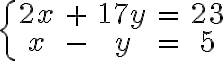
Matrices can be used for layout:
{(2x,+,17y,=,23),(x,-,y,=,5):}yields
Complex subscripts:
lim_(N->oo) sum_(i=0)^Nyields to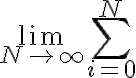
Subscripts must come before superscripts:
int_0^1 f(x)dxyields to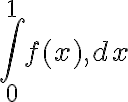
Derivatives:
f'(x) = dy/dxyields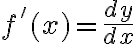
For variables other than x, y, z, or t you will need grouping symbols:
(dq)/(dp)yields
Overbraces and underbraces:
ubrace(1+2+3+4)_("4 terms")yields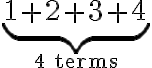
obrace(1+2+3+4)^("4 terms")yields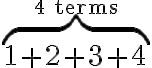
Attention: Always try to surround the
>and<characters with spaces so that the HTML parser does not confuse them with opening or closing tags.
Full syntax is elsewhere.
LaTeX
LaTeX is a software system for typesetting documents. We support the mathematics environments between brackets, $ for currency.
Calculations
When activated in a particular question, calculations between {@...@} will be automatically completed for you, rather than reaching for an external calculator.
- Type simple expressions using brackets for function arguments.
- Note angles are always in radians. E.g. try
{@cos(pi)@}for example. - Answers are given as floating point numbers, and you should choose the precision needed. E.g.
{@round(cos(2),3)@}
Accueil de la documentation | Index des catégories | Carte du site | Plan du site en anglais
 La documentation STACK est soumise à la licence Creative Commons Attribution-ShareAlike 4.0 International.